

Add repository secret
In your repo: Settings → Secrets and variables → Actions → New repository secret.Name:
GARNET_API_TOKEN · Value: your token from app.garnet.ai → Settings → API Tokens.Verify
Push or open a PR. Your run appears at app.garnet.ai within seconds — with a behavioral profile and check results.
Pinning
Floating tags like@v2 can move after you adopt them. For supply-chain hygiene, pin to the commit SHA of the latest release.
The canonical SHA is always available at garnet.ai/pins (human-readable) and garnet.ai/pins.txt (machine-readable). Both auto-update when a new release ships.
Configuration
| Input | Description | Required | Default |
|---|---|---|---|
api_token | Garnet API token from app.garnet.ai | Yes | — |
github_token | GitHub token for PR comments | No | ${{ github.token }} |
api_url | Garnet API base URL | No | https://api.garnet.ai |
garnetctl_version | Garnet CLI version (1.2.3 or latest) | No | latest |
jibril_version | Jibril sensor version (v2.10.8 or latest) | No | auto |
debug | Enable debug mode and upload logs as artifacts | No | false |
Outputs
| Output | Description |
|---|---|
profile_result | Check result for this run: pass or fail |
report_url | Link to the full run report on app.garnet.ai |
agent_id | Identifier for the Jibril sensor instance that ran |
Permissions
| Permission | Required | Why |
|---|---|---|
contents: read | Yes | Access workflow context and repository metadata |
pull-requests: write | Recommended | Post the runtime profile as a PR comment |
contents: write, actions: write, or access to any repository secrets beyond the ones you explicitly pass.
Job Summary
Garnet writes a Runtime Report to the GitHub Actions Job Summary automatically — check results, egress summary, and a link to the full run profile.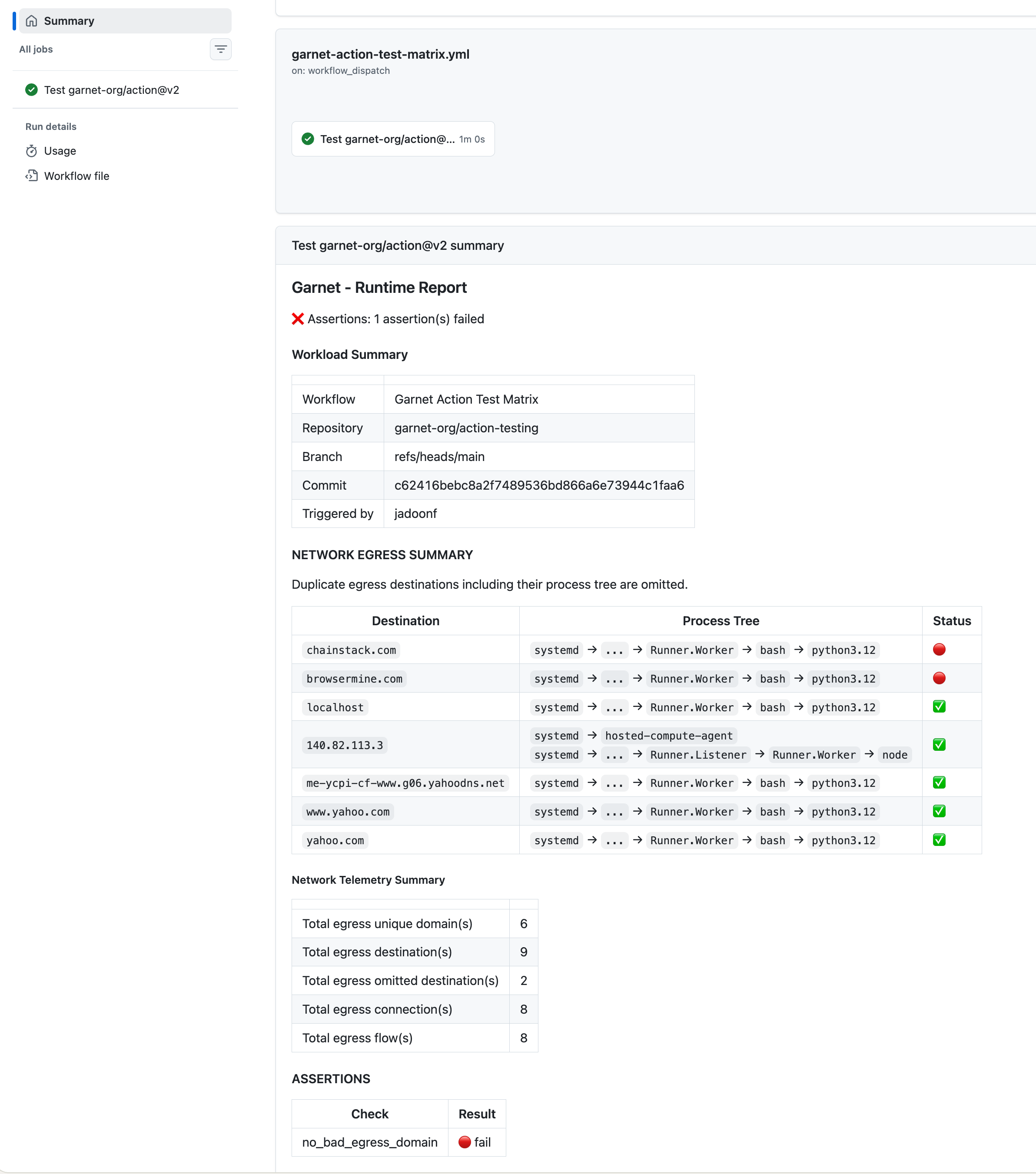
Why sudo
Jibril attaches eBPF programs at the kernel level — this requires sudo during install.ubuntu-latest runners include it by default. See Architecture for the safety model.
Troubleshooting
Agent doesn't appear in the dashboard
Agent doesn't appear in the dashboard
Verify
GARNET_API_TOKEN is set. Check workflow logs for the Garnet step.Permission denied
Permission denied
Requires sudo for eBPF.
ubuntu-latest includes it by default.No Job Summary
No Job Summary
Use the pinned v2 SHA from garnet.ai/pins — the SHA must match the latest release.
No PR comment
No PR comment
Grant
pull-requests: write in your workflow’s permissions block. The action uses github_token (defaults to ${{ github.token }}) to post comments.Debug mode
Debug mode