> ## Documentation Index
> Fetch the complete documentation index at: https://docs.garnet.ai/llms.txt
> Use this file to discover all available pages before exploring further.
# GitHub Actions
> The Garnet Action reference — inputs, outputs, pinning, integrations, and troubleshooting.
In your repo: **Settings** → **Secrets and variables** → **Actions** → **New repository secret**.
Name: `GARNET_API_TOKEN` · Value: your token from [app.garnet.ai](https://app.garnet.ai) → **Settings** → **API Tokens**.
```yaml theme={null}
name: CI
on:
push:
branches: [main]
pull_request:
branches: [main]
jobs:
build:
runs-on: ubuntu-latest
permissions:
contents: read
pull-requests: write
steps:
- uses: actions/checkout@v4
- name: Garnet Run Profile
uses: garnet-org/action@2b7fc9d79b54f551b43358c27424a36064b3e078 # v2
with:
api_token: ${{ secrets.GARNET_API_TOKEN }}
# your existing build, test, and deploy steps continue here
```
The agent runs in the background and profiles all subsequent steps.
Push or open a PR. Garnet posts a [Run Profile](/run-profile) as a PR comment (and at [app.garnet.ai](https://app.garnet.ai)) within seconds — with [check results](/reference/checks).
## Pinning
Floating tags like `@v2` can move after you adopt them. For supply-chain hygiene, pin to the **commit SHA** of the latest release.
The canonical SHA is always available at [garnet.ai/pins](https://garnet.ai/pins) (human-readable) and [garnet.ai/pins.txt](https://garnet.ai/pins.txt) (machine-readable). Both auto-update when a new release ships.
```yaml theme={null}
# Recommended: pinned to release commit SHA
- uses: garnet-org/action@2b7fc9d79b54f551b43358c27424a36064b3e078 # v2
# Quick start (floating tag — tracks latest v2.x.x):
- uses: garnet-org/action@v2
```
## Configuration
| Input | Description | Required | Default |
| :------------------ | :----------------------------------------------------------- | :------- | :---------------------- |
| `api_token` | Garnet API token from [app.garnet.ai](https://app.garnet.ai) | Yes | — |
| `github_token` | GitHub token for PR comments | No | `${{ github.token }}` |
| `api_url` | Garnet API base URL | No | `https://api.garnet.ai` |
| `garnetctl_version` | Garnet CLI version (`1.2.3` or `latest`) | No | `latest` |
| `jibril_version` | Jibril sensor version (`v2.10.8` or `latest`) | No | auto |
| `debug` | Enable debug mode and upload logs as artifacts | No | `false` |
## Outputs
| Output | Description |
| :--------------- | :--------------------------------------------------------------------- |
| `profile_result` | Check result for this run: `pass` or `fail` |
| `report_url` | Link to the full Run Profile on [app.garnet.ai](https://app.garnet.ai) |
| `agent_id` | Identifier for the Jibril sensor instance that ran |
## Permissions
| Permission | Required | Why |
| :--------------------- | :---------- | :---------------------------------------------- |
| `contents: read` | Yes | Access workflow context and repository metadata |
| `pull-requests: write` | Recommended | Post the Run Profile as a PR comment |
The action does not require `contents: write`, `actions: write`, or access to any repository secrets beyond the token you pass. Full model: [Trust & security](/trust).
## Run Profile summary
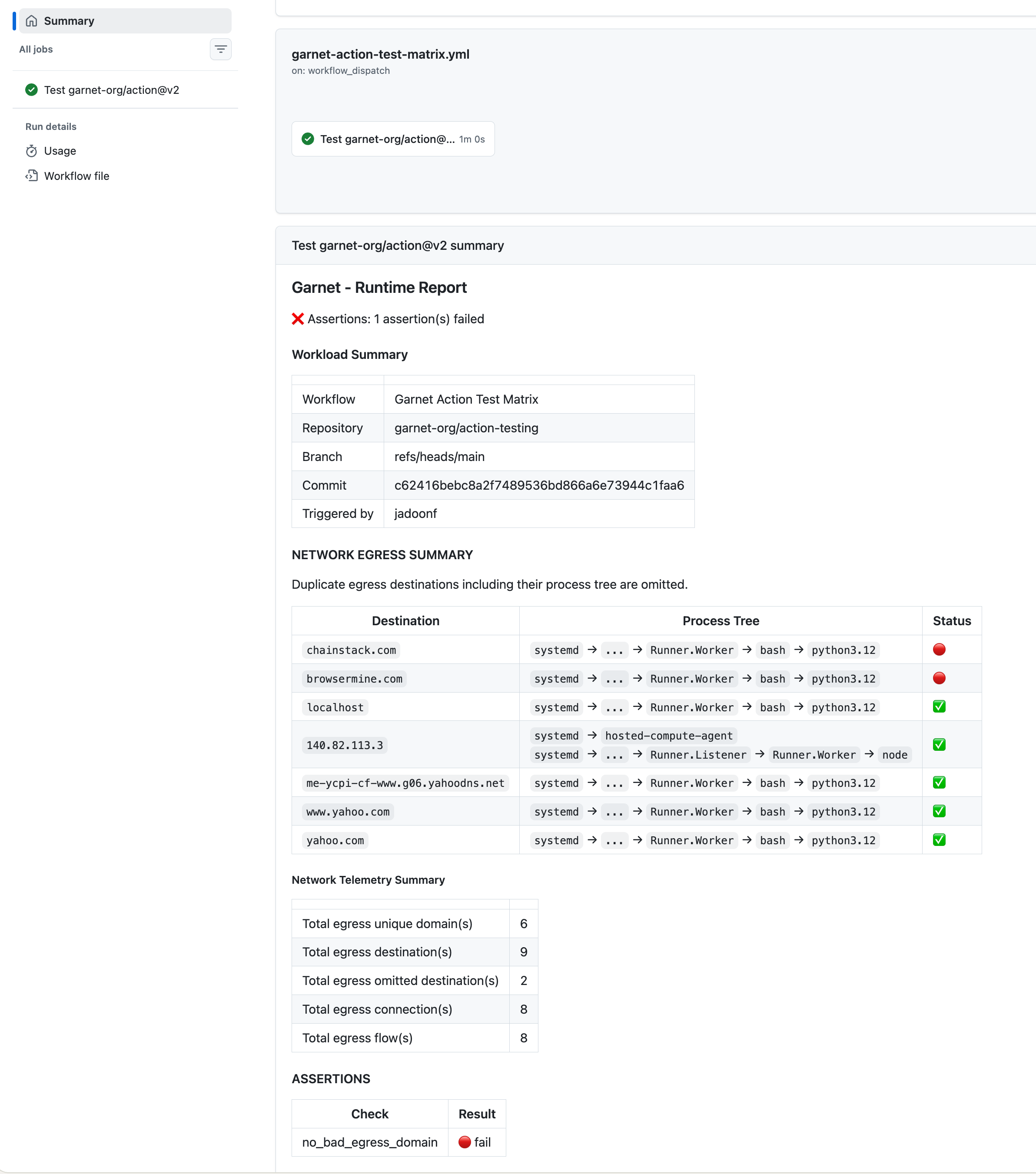
Garnet writes the **Run Profile summary** to the GitHub Actions Job Summary automatically — check results, egress summary, and a link to the full [Run Profile](/run-profile). It mirrors the PR comment, with the same **Clean / Needs review** state (and **Pending** while it profiles).
 ## Gate a merge (optional)
By default the action **does not fail your job** — a failed check is reported, not enforced. To turn a `Needs review` result into a hard gate, branch on the `profile_result` output:
```yaml theme={null}
- uses: garnet-org/action@2b7fc9d79b54f551b43358c27424a36064b3e078 # v2
id: garnet
with:
api_token: ${{ secrets.GARNET_API_TOKEN }}
# ... your build/test steps ...
- name: Fail on a needs-review Run Profile
if: steps.garnet.outputs.profile_result == 'fail'
run: |
echo "Runtime check failed — see ${{ steps.garnet.outputs.report_url }}"
exit 1
```
Pair this with a required status check in your branch protection rules to block merges on a failed run.
## Outputs & integrations
The Run Profile reaches you through several surfaces:
* **PR comment** — automatic on every run (requires `pull-requests: write`).
* **Run Profile summary** — automatic in the GitHub Actions run.
* **Slack / HTTP webhooks** — opt-in, configured under **Settings → Alerting** at [app.garnet.ai](https://app.garnet.ai).
**Slack:** Create an [Incoming Webhook](https://api.slack.com/apps?new_app=1) in your workspace, then paste the URL in **Settings → Alerting → Add Webhook**. Failed checks trigger a notification with the run link, repository, and evidence summary.
**HTTP:** Point any endpoint at your webhook URL. Garnet sends a `POST` with a JSON payload containing the run ID, repository, check results, and the domains to review.
## Why sudo
Jibril attaches eBPF programs at the kernel level — this requires sudo during install. `ubuntu-latest` runners include it by default. See [Trust & security](/trust) for the full safety model.
## Troubleshooting
Verify `GARNET_API_TOKEN` is set. Check workflow logs for the Garnet step.
Requires sudo for eBPF. `ubuntu-latest` includes it by default.
Use the pinned v2 SHA from [garnet.ai/pins](https://garnet.ai/pins) — the SHA must match the latest release.
Grant `pull-requests: write` in your workflow's `permissions` block. The action uses `github_token` (defaults to `${{ github.token }}`) to post comments.
```yaml theme={null}
- uses: garnet-org/action@2b7fc9d79b54f551b43358c27424a36064b3e078 # v2
with:
api_token: ${{ secrets.GARNET_API_TOKEN }}
debug: true
```
## Gate a merge (optional)
By default the action **does not fail your job** — a failed check is reported, not enforced. To turn a `Needs review` result into a hard gate, branch on the `profile_result` output:
```yaml theme={null}
- uses: garnet-org/action@2b7fc9d79b54f551b43358c27424a36064b3e078 # v2
id: garnet
with:
api_token: ${{ secrets.GARNET_API_TOKEN }}
# ... your build/test steps ...
- name: Fail on a needs-review Run Profile
if: steps.garnet.outputs.profile_result == 'fail'
run: |
echo "Runtime check failed — see ${{ steps.garnet.outputs.report_url }}"
exit 1
```
Pair this with a required status check in your branch protection rules to block merges on a failed run.
## Outputs & integrations
The Run Profile reaches you through several surfaces:
* **PR comment** — automatic on every run (requires `pull-requests: write`).
* **Run Profile summary** — automatic in the GitHub Actions run.
* **Slack / HTTP webhooks** — opt-in, configured under **Settings → Alerting** at [app.garnet.ai](https://app.garnet.ai).
**Slack:** Create an [Incoming Webhook](https://api.slack.com/apps?new_app=1) in your workspace, then paste the URL in **Settings → Alerting → Add Webhook**. Failed checks trigger a notification with the run link, repository, and evidence summary.
**HTTP:** Point any endpoint at your webhook URL. Garnet sends a `POST` with a JSON payload containing the run ID, repository, check results, and the domains to review.
## Why sudo
Jibril attaches eBPF programs at the kernel level — this requires sudo during install. `ubuntu-latest` runners include it by default. See [Trust & security](/trust) for the full safety model.
## Troubleshooting
Verify `GARNET_API_TOKEN` is set. Check workflow logs for the Garnet step.
Requires sudo for eBPF. `ubuntu-latest` includes it by default.
Use the pinned v2 SHA from [garnet.ai/pins](https://garnet.ai/pins) — the SHA must match the latest release.
Grant `pull-requests: write` in your workflow's `permissions` block. The action uses `github_token` (defaults to `${{ github.token }}`) to post comments.
```yaml theme={null}
- uses: garnet-org/action@2b7fc9d79b54f551b43358c27424a36064b3e078 # v2
with:
api_token: ${{ secrets.GARNET_API_TOKEN }}
debug: true
```